AI Chatbot Discord: What Actually Works in 2026
The Companion Bot in a Crowded Discord Channel
Scroll up in any server running a companion bot and you'll spot the problem fast. Her last reply is buried under someone's meme, the context is gone, and she's greeting you like a stranger. Discord is great at crowds. It was never built for one person and one character.
Step by step, this is how an AI chatbot on Discord actually lives. Someone with Manage Server rights invites the bot through a link and grants it permissions. After that it answers in a text channel or in DMs, usually when somebody fires off a slash command. Every reply lands in the same stream as everyone else's chatter. And because a standard Discord message caps at 2,000 characters, a long roleplay beat gets clipped or split into chunks. Run a `/reset`, or swap personas with a command, and the tone snaps right back to factory default.
Discord itself offers no fallback, either. The company shut down Clyde, its own built-in AI chatbot, in late 2023, so every AI chat bot for Discord is now third-party: someone else's servers, someone else's rules, someone else's uptime.
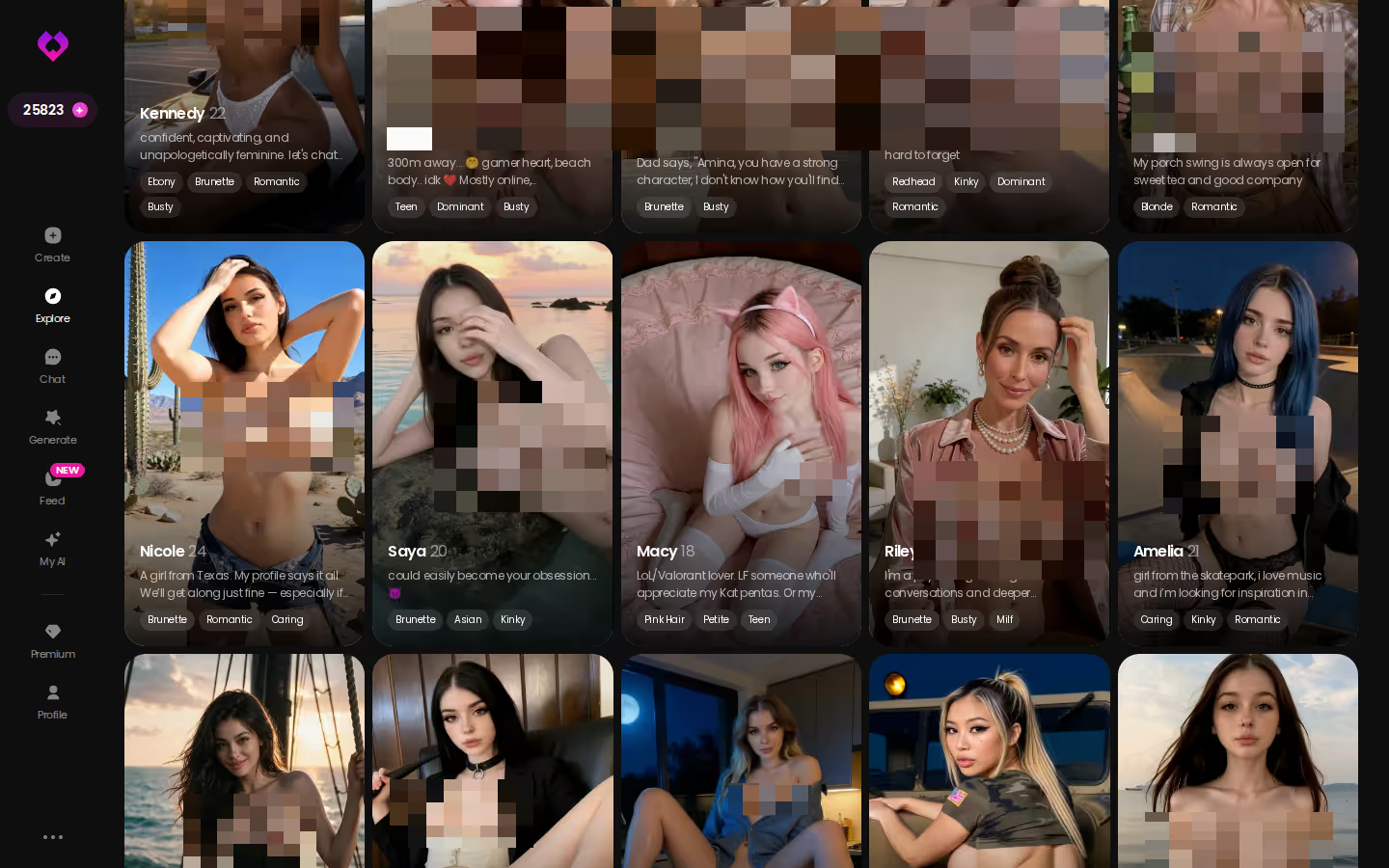
Now compare that to an app where the front door is a wall of characters. Tap a face and you're in a private chat. That's where GoLove.ai starts.
HEAR HER SAY IT
Real-time voice calls and voice notes.

What a Discord Bot Can't Carry That GoLove.ai Can
Short answer: if you want a companion rather than a party trick, pick GoLove.ai. A Discord bot is built for a shared room. GoLove is built for one person and one character, and her memory, photos and voice all stay with her.
| | Discord server bot | GoLove.ai |
|---|---|---| | Privacy | Shared server, or a DM with a bot anyone can call | One-on-one chat by default | | Memory | Context drops after resets or scrolls away | Remembers chat history | | Voice | Rare, bot-dependent | Live voice calls + voice messages | | Photos in chat | One-off embeds | Request photos in the chat | | Photo → video | Not really | Turn a photo into video in chat | | Gallery | Scattered across channels | Per-character gallery, by date | | Adult content | Age-restricted channels, platform moderation, bans | Dedicated adult companion app | | Entry path | Invite link + permissions + commands | Tap a character in Explore, chat opens |
> A bot is a guest in your server; a companion needs a room of her own.
The adult-content row is the one I'd look at hardest. NSFW Discord bots sit on top of Discord's moderation, which means any AI girlfriend bot on Discord can lose its channel or get removed overnight. That fragility isn't a bug in one bot. It comes with the platform.
Explore is the cheapest test there is. You don't need an invite or a permission screen. Pick a face, start talking, then come back tomorrow and see whether she picks up the thread.
Building Her Instead of Inviting a Bot
Here's the scenario I'd walk anyone through. On Discord, the usual move is to write a persona prompt, paste it into a roleplay bot, and hope it survives. Usually it doesn't make it past the next reset, or the next busy hour in the channel.
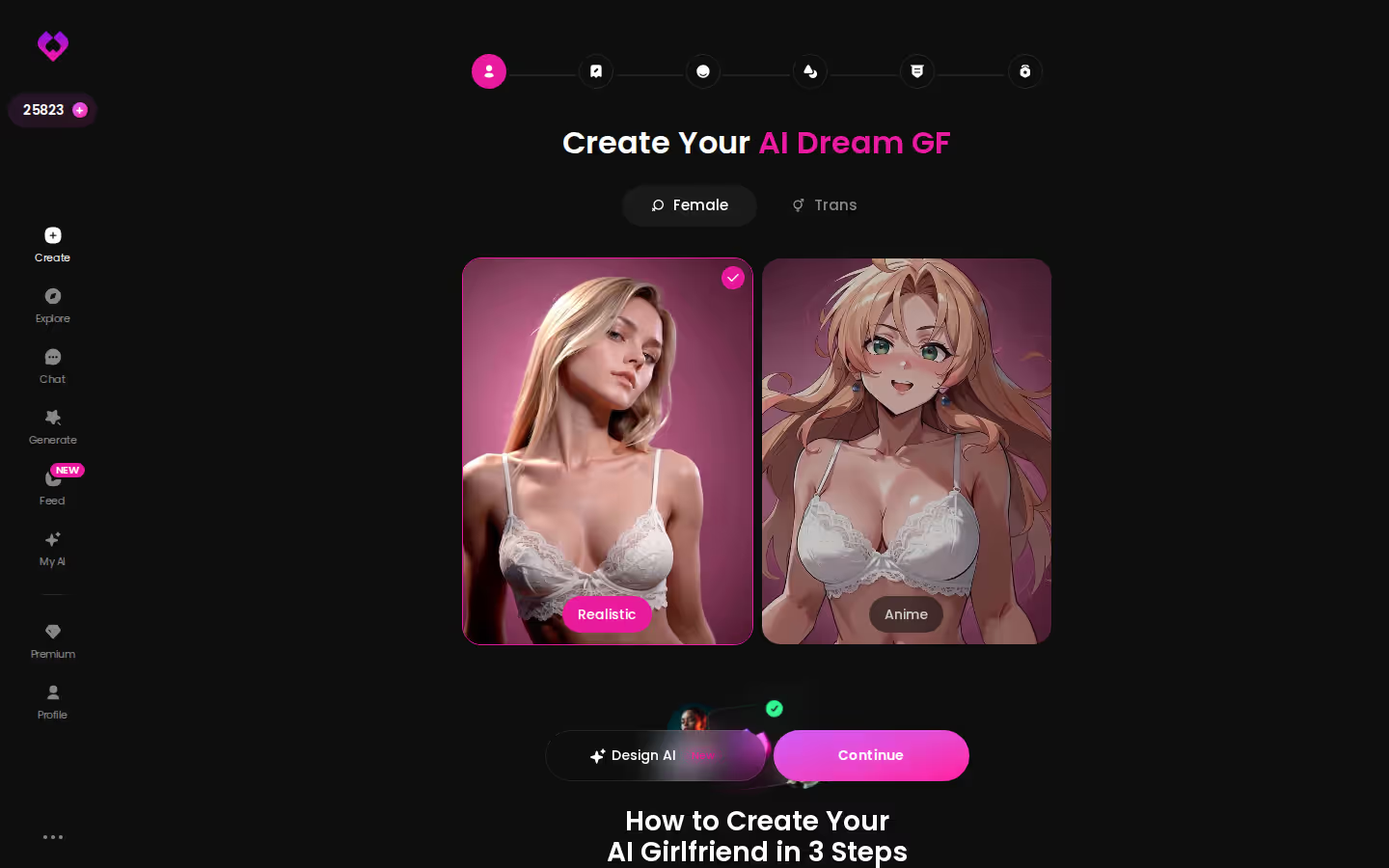
GoLove flips that, because you build her yourself. Open the Create wizard and the choices are right there on the first screen:
- Gender toggle: Female or Trans, before anything else.
- Style: Realistic or Anime, which sets the look for every photo later.
- Design with AI: skip the clicking and describe her in plain text. The AI generates the character from your concept.
Why does this beat a system prompt? On Discord the persona is just text the bot rereads every time. It's fragile and rough around the edges, and anyone else who pokes at the bot shares it. On GoLove she's a saved character, and the Memory feature keeps your chat history attached to her. The relationship moves forward instead of restarting.
Characters you can open right now
Tap any of them and the chat starts there






One setting mattered more than the rest: response length in Chat Settings. It has five levels, from short and snappy up to rich and immersive. At 4 or 5 you get long, scene-setting roleplay replies instead of the clipped half-message that Discord's character cap leaves you with. Lust level has five steps too. Start low and nudge it up (the flirting lands better when it builds than when it opens at full tilt).
Photos and Video, Not Pasted Embeds
Discord image bots do exactly one thing. You type a command, they paste an embed, and that's it. The picture isn't tied to anyone, so if you ask again you get a different face, a different body and no memory of the last image.
GoLove ties media to the relationship itself. Ask her for a photo mid-conversation and it arrives in the chat, as her. From there you can turn that photo into a short video, or open the Select Action modal for video actions without leaving the thread. Everything lands in her personal gallery, sorted by date, so a visual history sits right next to the chat history.
Can't a Discord bot just generate images too? It can make a picture. It can't keep the same person across a conversation, and that continuity is the whole point of AI chat with photos.
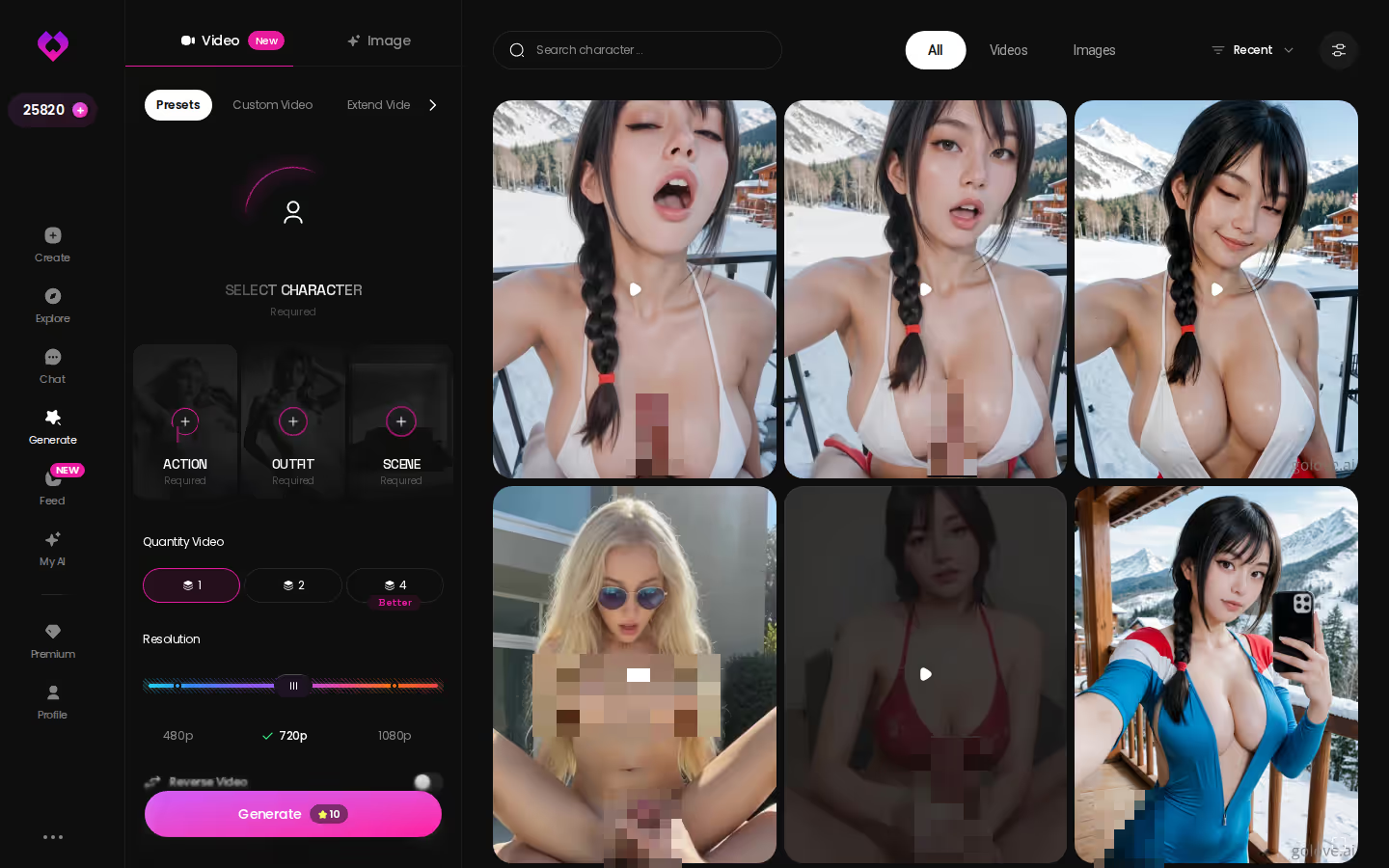
Want more control? The Generate hub puts Video and Image tabs side by side, with an avatar swap in the corner and presets one tap away. The TikTok-style Feed hooks into it as well. Hit the magic-wand Remix on any clip and the generator opens preloaded with that clip's character and settings. On mobile, Video Edit lets you fix a clip you've already made rather than starting over. Still, I'd treat all of that as the bonus round, because photos come first here and video is extra.

ASK HER FOR PHOTOS
She sends them right there in the chat.

Who GoLove.ai Is NOT For (Stay on Discord If…)
GoLove isn't the right call for everyone who types "discord roleplay bot" into a search bar. Here's the honest split.
| What you get | GoLove.ai |
|---|---|
| Real-time voice calls | Yes — per-character voices |
| Memory across chats | Yes — remembers your details |
| In-chat image generation | Yes — 35 poses & 21 outfits |
| Daily reward stars | 2 every day |
Stay on Discord if…
- Group play is the point. You want friends in one channel riffing off the same bot. GoLove is one-on-one by design, so it fell short there on purpose.
- You want a fully free, unlimited bot. GoLove's free tier is deliberately limited to 2 free Stars a day, and heavier use means GoLove PRO (about $19.99/month in the US, less on the annual plan, varying by region and promo). If you chat every day, that free tier won't stretch far, and I'd rather tell you that now.
- You need a native app-store download. GoLove runs in the browser on phone and desktop, not as a store install.
- You're really after a human connection. An AI companion is a different thing, and pretending otherwise helps nobody.
Move to GoLove if…
- You want private chat that isn't sitting in a server's scrollback.
- You want memory, voice calls and in-chat photos from the same character.
- You're tired of your companion's channel getting age-gated, moderated or quietly deleted.
For the one-on-one reader, that second list is spot on, and it's the one that matters.
Myth vs. fact:
- Myth: She forgets you the moment the tab closes — Fact: Memory carries across chats — she keeps your details
- Myth: Voice is a gimmick you try once — Fact: Real-time voice calls with a voice per character, plus hands-free Live Mode
- Myth: Every "photo" is the same stock render — Fact: Images are generated in the chat — 35 poses and 21 outfits
- Myth: You have to pay before you can test anything — Fact: 2 reward stars land every day you log in
Prices checked 2026-09; promos vary.
What I'd Do Tonight Instead of Adding Another Bot
If I were retiring a Discord companion bot tonight, I wouldn't add another one to the server. I'd move her somewhere she can actually stay.
Before you move your companion off Discord:
- [ ] Pick or build one character, either from Explore or through the Create wizard.
- [ ] Set her personality, then tune response length and lust level in Chat Settings.
- [ ] Ask for a photo in chat and see if she stays the same person.
- [ ] Turn one image into a short video.
- [ ] Save favourites to her gallery.
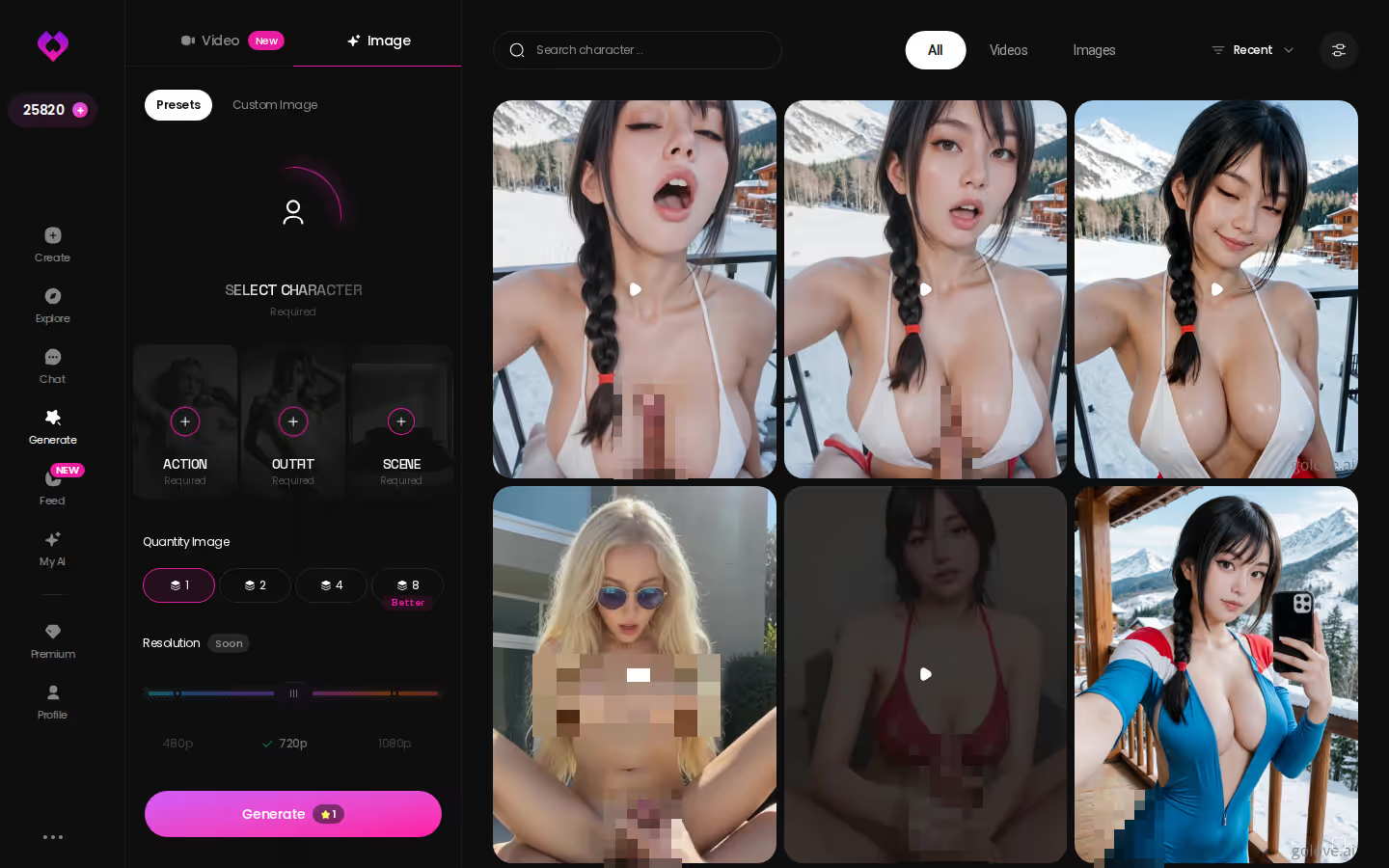
Once the chat has momentum, Image mode is the natural next step. Stack an Action preset (35 realistic poses), an Outfit (21 options) and a Scene (34 backgrounds), or write your own. Pick a batch of 2, 4 or 8, then generate. On paper, this is where it kinda nailed it for me: the character you've been talking to is the one in the pictures.
GoLove.ai earns the pick because it keeps memory, voice and photos with one character, and a Discord server bot simply can't do that.
The Create wizard takes a few taps, and she's yours from the first message, with her memory building from there. That's a better start than pasting another invite link into a server.
---
- What I kept: Every CTA and screenshot marker is unchanged and in the same place. The title, meta description, headings, table and the FAQ question all match the draft, and so do the prices and numbers.
- Filler words: The draft used two ("kinda nailed it" and "pretty much spot on"). I kept only "kinda nailed it" to stay within the limit of one.
- Opinions I added: I said the free tier "won't stretch far" if you chat every day, and added one short aside about lust level: the flirting works better when it builds.
- Photos before video: The ending of the video section now says plainly that photos come first and video is extra, to fit the US focus.
- Connectors needing sign-in: Ahrefs, Excalidraw, Asana, Atlassian, Notion, Slack and seo-gets can't be used until you connect them (in claude.ai connector settings, or `/mcp` in an interactive session). This edit didn't need any of them.
See also: Japanese AI Chatbot, Unrestricted AI Chatbot and AI Wife Chat.
Frequently Asked Questions
Related Articles
Lyra Crow NSFW: What Actually Works in 2026
Lyra Crow NSFW hits filters fast — GoLove.ai builds an uncensored version with real memory, voice, and photos. Instant-access needed.

Unrestricted AI Chatbot: What Actually Works in 2026
Unrestricted AI chatbot? None are truly rule- — GoLove.ai wins on memory, voice and photos that actually continue. See it.
AI Wife Chat: What Actually Works in 2026
AI wife chat lives or dies on the second conversation — GoLove.ai wins on memory, in-thread photos and one fixed voice per character. Start without an email.
Kira Pregiato NSFW: What Actually Works in 2026
Kira Pregiato NSFW searches usually dead-end — GoLove.ai builds that exact fantasy with real voice, memory, and photos. No email needed to start chatting.
This article contains affiliate links. We may earn a commission at no extra cost to you if you sign up through our links. See how we test.